
Wix + GCash · Philippines
Accept GCash and bank transfers on your Wix store
Customers pay your GCash or bank account like they do now. The receipt lands on the right Wix order instead of somewhere in Messenger. Try it free for 14 days.
The problem
Wix has no GCash button for most Philippine stores.
So the order comes in unpaid, the customer pays your GCash QR, and the proof arrives as a screenshot in Messenger, Viber or email. Then someone has to work out which order it belongs to.
Screenshots everywhere
Receipts sit in three apps and nobody knows which ones were checked.
Orders you can't match
The screenshot says ₱1,500. You have four orders for ₱1,500 today.
Slow shipping
Orders wait until someone finds the proof, so customers wait too.
Your three options
Three ways to take GCash on Wix. Pick the one that fits.
Each one works. They differ in what they cost and how much checking is left for you.
A payment gateway
A fee on every sale
- Yes: Customer pays at checkout
- Yes: Order marked paid by itself
- No: No per-sale fee
- No: No merchant sign-up
Best when you sell a lot and want no manual checks at all.
Wix manual payment
Free
- Yes: Customer pays your GCash or bank
- No: Receipt saved on the order
- Partly: You know which order paid
- Yes: No per-sale fee
Fine for a handful of orders, until the screenshots pile up in Messenger.
Z Proof of Payment
From $14/month, billed through Wix
- Yes: Customer pays your GCash or bank
- Yes: Receipt saved on the order
- Yes: Amount checked against the order
- Yes: No per-sale fee
Best when you want to keep GCash direct but stop chasing proof. 14-day free trial.
Gateway fee example: PayMongo publishes 2.23% per GCash payment, plus VAT on the fee (October 2026). Wix lists PayPal, Xendit, Paymentwall, HitPay and DragonPay as payment providers for the Philippines. The full walk-through is in our guide, How to Accept GCash on Wix (2026).
How Z Proof of Payment works
Three steps, right inside the Wix order.
- 01
Send the link
From the Wix order, send an upload link by Messenger, Viber or SMS.
- 02
Customer pays and uploads
They pay with your GCash QR and upload the receipt. The amount is already filled in.
- 03
Staff check it
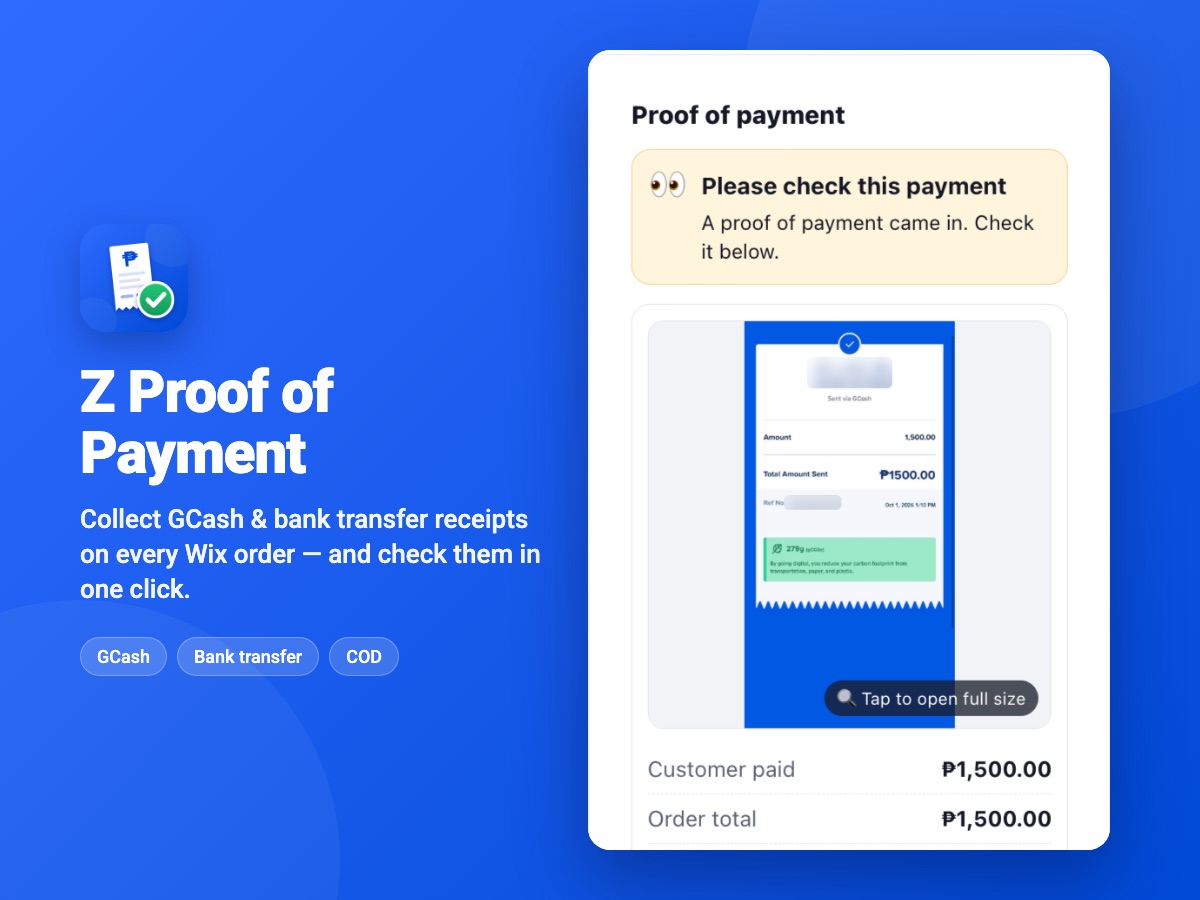
The receipt shows on the order with an amount-match check. Staff confirm the money arrived, and the app can record the payment so the order shows as paid.
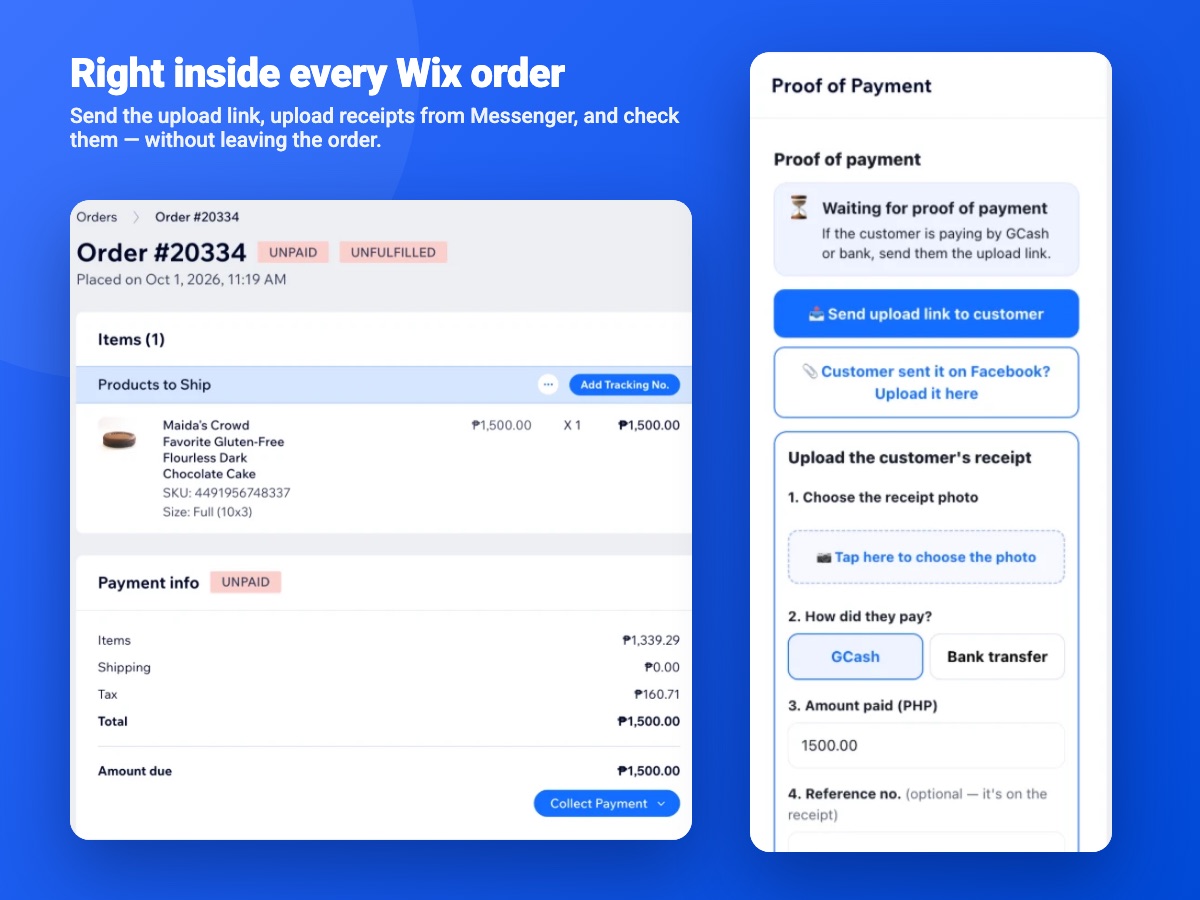
Phone-friendly upload page
With your logo, GCash QR code and bank details, and the amount pre-filled.
Staff upload too
Got a receipt on Facebook or in person? Add it to the order from the order page.
COD, GCash or Bank on every order
A payment selector with matching order tags, so your list stays tidy.
Private by design
Receipts open only through secure links. Orders show as paid only after your team verifies the receipt.
Pricing
From $14 a month. No fee per sale.
A flat monthly price, billed through your Wix account. Both plans start with a 14-day free trial, and you cancel in Wix any time.
Basic
$14/month
- 250 proofs of payment a month
- GCash and bank-transfer uploads
- 14-day free trial
- Billed through Wix
Unlimited
$26/month
- No limit on proofs of payment
- GCash and bank-transfer uploads
- 24/7 support
- 14-day free trial
- Billed through Wix
Works with any Wix site that has Wix eCommerce (Wix Stores). More about Z Proof of Payment
Read more
Guides for GCash on Wix.
 GuidesHow to Accept GCash on Wix (2026)Wix has no built-in GCash button for most Philippine stores. Here are the three ways to take GCash on Wix, what each one costs, and how to set up the one that fits.Read it
  GuidesGCash Screenshot Payments: How to Stop Chasing Proof of PaymentReceipts lost in Messenger, orders you can't match, screenshots you can't trust. A simple system for GCash and bank-transfer proof of payment that your whole team can follow.Read it
Questions
Good questions, straight answers.
Can I accept GCash on Wix?
Yes, in two ways. You can connect a payment gateway that Wix supports in the Philippines and that offers GCash, so customers pay at checkout and the order is marked paid. Or customers pay your own GCash number or QR code and send proof, which you collect on the order with an app like Z Proof of Payment.
Is GCash available as a Wix payment method in the Philippines?
Not as a built-in Wix method. Wix lists PayPal, Xendit, Paymentwall, HitPay and DragonPay as payment providers for the Philippines (Wix Help Center, October 2026). GCash comes through one of those gateways, or as a manual payment to your own GCash account.
How do customers send proof of payment on Wix?
Wix has no place for a receipt on its own, so most stores ask for a screenshot on Messenger or by email and match it by hand. With Z Proof of Payment, the customer opens a link to a phone-friendly upload page and the receipt lands on the order itself. Staff can also upload a receipt that came in on Facebook or in person.
Do I need a payment gateway like PayMongo or HitPay?
Only if you want payments confirmed automatically. A gateway charges a fee on every sale (PayMongo publishes 2.23% for GCash, plus VAT on the fee, as of October 2026). If customers already pay your GCash or bank account directly, you don't need one: Z Proof of Payment only collects and organises the receipts.
Does the app mark orders as paid automatically?
Not on its own. The app shows whether the amount the customer typed matches the order total, and a person on your team checks your GCash or bank app to confirm the money arrived. Once they verify it, the app can record the payment for you (it's optional), so the order shows as paid.
Ready to stop chasing screenshots?
Add Z Proof of Payment to your Wix store and try it free for 14 days.
Free, no call needed
Need a whole new Wix store?
Type your business name and watch a free demo of your new store build itself. Our team in the US and Davao builds the real one at a fixed price.
Rather talk? WhatsApp +63 933 133 9166